

Comments
CL_SALV_TABLE class to create basic ABAP ALV report within SAP
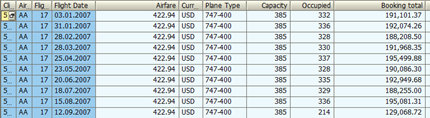
This is a very basic ALV example which uses the CL_SALV_TABLE functionality, it demonstrates how easy it is to create
an ALV report using this class method assuming you want to select data from a data dictionary table and disaplay all
fields in the report.
See cl_salv_table for a more detailed version of this including
setting custom header texts and selecting which fields to output.
*&---------------------------------------------------------------------*
*& Report  ZSALV_BASIC
*&---------------------------------------------------------------------*
*& Display very basic ALV report using CL_SALV_TABLE
*&---------------------------------------------------------------------*
REPORT ZSALV_BASIC.

*Data Declaration
*----------------
DATA: it_sflight TYPE TABLE OF sflight.
DATA: alv_table TYPE REF TO   cl_salv_table.

************************************************************************
*START-OF-SELECTION.
START-OF-SELECTION.

  SELECT *
   UP TO 10 ROWS
    FROM sflight
    INTO TABLE it_sflight.

* Create instance of ALV table object
  CALL METHOD cl_salv_table=>factory
    IMPORTING
      r_salv_table = alv_table
    CHANGING
      t_table      = it_sflight.

* Display ALV table.
  alv_table->display( ).
Display ALV as classic LIST
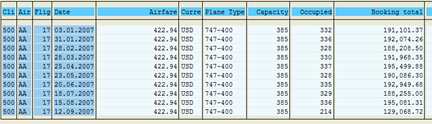
You can also add the list_display parameter to display the report in the older/classic list format.
*Data Declaration
*----------------
DATA: it_sflight TYPE TABLE OF sflight.
DATA: alv_table TYPE REF TO   cl_salv_table.

************************************************************************
*START-OF-SELECTION.
START-OF-SELECTION.

  SELECT *
   UP TO 10 ROWS
    FROM sflight
    INTO TABLE it_sflight.

* Create instance of ALV table object
  CALL METHOD cl_salv_table=>factory
    EXPORTING
      list_display = if_salv_c_bool_sap=>true
    IMPORTING
      r_salv_table = alv_table
    CHANGING
      t_table      = it_sflight.

* Display ALV table.
  alv_table->display( ).
Also see this FREE OO ALV course on Udemy
If this course stops being free i would be gratefull if someone could post a message below to let me know
