

SAP BW Query User exit RSR00001 to populate query authorisation object dynamically
Please note this article has been written from an ABAPers point of view and some knowledge of creating BW
queries will be required.
In-order to implement the SAP BW user exit RSR00001 you first need to create an authorisation object which references a $Variable. In this example I am using
$ZGMGRANT, which has been linked to the users authorisation profile via transaction PFCG.
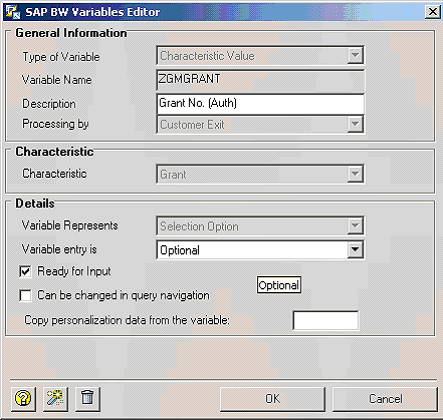
Now Within the BW query you have created via Bex Analyser you need to create and authorisation field with
the processing type of 'customer exit'.
The next step is to activate the customer exit 'EXIT_SAPLRRS0_001'. To do this create a project in the CMOD
transaction, select the SAP enhancement RSR00001 and assign it to the enhancement project. Activate
the project.
The enhancement RSR00001 (BW: Enhancements for Global Variables in Reporting) is called up several times
during execution of the report. Here, the parameter I_STEP specifies when the enhancement is called.
I_STEP = 1
Call takes place directly before variable entry. Can be used to pre populate selection variables
I_STEP = 2
Call takes place directly after variable entry. This step is only started up when the same variable
is not input ready and could not be filled at I_STEP=1.
I_STEP = 3
In this call, you can check the values of the variables. Triggering an exception (RAISE) causes the
variable screen to appear once more. Afterwards, I_STEP=2 is also called again.
I_STEP = 0
The enhancement is not called from the variable screen. The call can come from the authorization
check or from the Monitor. This is where you want to put the mod for populating the authorization
object. code for this is as follows:
  case i_vnam.
  WHEN 'ZGMGRANT'.  "Query field name
    if i_step = 0.
      BREAK-POINT.
      clear wa_ETRANGE.

*     Gets all grants a user is able to see from ZTable,
*     which is populated elsewhere
      select grant_nbr
        from ZGMUSERGRANTS
        into corresponding fields of table it_ZGMUSERGRANTS
       where UNAME eq sy-uname.

*     Populate Authorisation Object. In i_step 0
*     E_T_RANGE is used to populate the authorisation object
      loop at it_ZGMUSERGRANTS into wa_ZGMUSERGRANTS.
        wa_ETRANGE-sign = 'I'.
        wa_ETRANGE-opt = 'EQ'.
        CALL FUNCTION 'CONVERSION_EXIT_ALPHA_INPUT'
          EXPORTING
            INPUT         = wa_ZGMUSERGRANTS-grant_nbr
         IMPORTING
           OUTPUT        = wa_ZGMUSERGRANTS-grant_nbr.
        wa_ETRANGE-low  = wa_ZGMUSERGRANTS-grant_nbr.
        append wa_ETRANGE to E_T_RANGE.
      endloop.
    endif.
  ENDCASE.
|
 SAP BW Query Exit to restrict users output