

Get selected ABAP Web dynpro dropdown byindex value (dropdownbyindex UI element)
Below is a simple steps required to retrieve the value selected by a user from an abap web dynpro dropdown list created
via a dropdownbyindex UI element. Also see Creating Web Dynpro dropdownbyindex
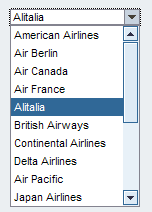
Once you have got your wdp dropdown list working correctly as detailed in Dynpro dropdown list you simply need to
add the following ABAP code at the point where you want to retrieve the data. i.e. within an abap web dynpro action/method.
* Create local data variable to access context information
  Data: context_node type ref to if_wd_context_node.

* Create table based on context structure
  data: it_ddvalue type STANDARD TABLE OF if_view1=>element_DROPDOWN_CARRIERS, "replace view1 with name of view
        wa_ddvalue like line of it_ddvalue,
        index type i.

* Assign context_node variable to dropdown context node
  context_node = wd_context->get_child_node( name = 'DROPDOWN_CARRIERS').

* Get index of currectly selected value
  index =  context_node->GET_LEAD_SELECTION_INDEX( ).

* Use index to get actual details of currently selected value
  context_node->GET_STATIC_ATTRIBUTES(
     exporting index = index
     importing STATIC_ATTRIBUTES = wa_ddvalue ).

*Process retrived data
*    wa_ddvalue-carrid   "stores selected carrid depending name given in your context
*    wa_ddvalue-carrname "stores selected carrname depending...
Please note depending on the name of your wdp VIEW and context node some of this code may need changing slightly.
For example ABAP code section if_view1=>element_DROPDOWN_CARRIERS. This references view 'view1' and context 'DROPDOWN_CARRIERS'
but you would need to reference your particular details. i.e. If your view was called 'MAIN' and your context element was
'DD_VALUES' this section of code would look like this if_main=>element_DD_VALUES.
Also context_node = wd_context->get_child_node( name = 'DROPDOWN_CARRIERS') would become
context_node = wd_context->get_child_node( name = 'DD_VALUES')