

SAP Database locking using ENQUEUE and DEQUEUE
SAP provides you with the ability to restrict access to data while the table is being updated. This is fairly
simple to implement via the use of a lock object (Created in SE11).
Basically the following steps will create two function modules, one to lock the data which starts with ENQUEUE_ and
one to release the lock which starts with DEQUEUE_.
When you want to update the data you simple use the ENQUEUE FM
before you perform any updates and when the updates have finished you simply release the lock using the DEQUEUE FM
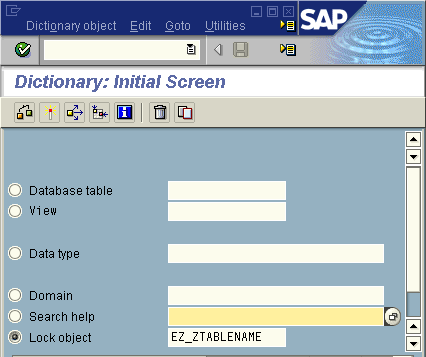
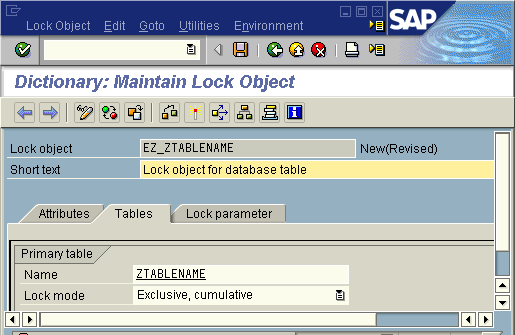
Step 1 - Create Lock object (SE11)
Step 2 - ABAP code to lock table entries
Add the following code in-order to create the table lock, use the a pattern functionality within the ABAP editor
to automatically generate the function call code. This will then bring through all appropriate importing and exporting
parameters. This function module must be called before any update takes place as this is what sets the lock. If a
lock has already been taken out it will display the appropriate message.
  CALL FUNCTION 'ENQUEUE_EZ_ZTABLENAME'
      EXPORTING
           mode_ZTABLENAME = 'E'  "E, S, X
           mandt              = sy-mandt
           KEYFIELD1           = "Value
           KEYFIELD2           = "Value
           KEYFIELD3           = "Value
                   ...
*         X_KEYFIELD1            = ' '
*         X_KEYFIELD2            = ' '
*         X_KEYFIELD3            = ' '
                   ...
*         _SCOPE             = '2'
*         _WAIT              = ' '
*         _COLLECT           = ' '
*   If exceptions are not used, message is displayed within FM
    EXCEPTIONS
         FOREIGN_LOCK       = 1
         SYSTEM_FAILURE     = 2
         OTHERS             = 3.

  IF sy-subrc <> 0.
*   Retrieve message displayed within Function Module
    message id     sy-msgid
              type   'I'
              number sy-msgno
              with   sy-msgv1 sy-msgv2 sy-msgv3 sy-msgv4.

***************OPTIONAL - Get more details of existing lock
* Also within here you can also use ENQUEUE_READ to find out more details about the existing lock
    data: it_enq type STANDARD TABLE OF SEQG3,
          wa_enq like line of it_enq,
          ld_gname type SEQG3-GNAME,
          ld_garg type SEQG3-GARG,

    ld_gname = 'ZTABLENAME'. "This is the name of the lock object as shown in tcode SM12
    CALL FUNCTION 'ENQUEUE_READ'
      EXPORTING
        GCLIENT               = SY-MANDT
        GNAME                 = ld_gname "Lock opject name
        GUNAME                = '*'      "User name, default is SY-UNAME but need to use * to return locks for all users
      TABLES
        ENQ                   = it_enq
      EXCEPTIONS
        COMMUNICATION_FAILURE = 1
        SYSTEM_FAILURE        = 2
        OTHERS                = 3.

    "will need to check values returned by FM to check what values are needed to build ld_garg value
    concatenate sy-mandt KEYFIELD1 KEYFIELD2 KEYFIELD3 into ld_garg .
    loop at it_enq into wa_enq where garg cs ld_garg.
      exit.
    endloop.
    check sy-subrc eq 0.
    if wa_enq-guname eq sy-uname.
      "Entry already being updated by you
    else.
      "Entry already being updated by someone else
    endif.
***************OPTIONAL
    EXIT.
  ENDIF.
Step 3 - ABAP code to Remove table lock(s)
The following code will remove the lock for the specific table entries.
CALL FUNCTION 'DEQUEUE_EZ_ZTABLENAME'
    EXPORTING
         MODE_ZTABLENAME = 'E'
         MANDT              = SY-MANDT
           mandt              = sy-mandt
           KEYFIELD1           = "Value
           KEYFIELD2           = "Value
           KEYFIELD3           = "Value
                   ...
*         X_KEYFIELD1            = ' '
*         X_KEYFIELD2            = ' '
*         X_KEYFIELD3            = ' '
                   ...
*         _SCOPE             = '3'
*         _SYNCHRON          = ' '
*         _COLLECT           = ' '
          .
Step 4 - Lock function module parameters
Further details about the parameters of the ENQUEUE(lock) and DEQUEUE(unlock) function modules:
mode_ZTABLENAME - set lock mode
S = Read Lock (share lock for read only access), other users can requerst read access when this lock is active
E = Write Lock (Exclusive lock which prevents all other lock types from other users)
X = Exclusive not cumulative. Even same user can't request another write lock until previous lock has been released
_SCOPE - defines the level of the lock owner
1 - Only exists in dialog transaction. Dequeue, Commit work and roll back releases the lock
2 - Exists in the update transaction so will be release with DEQUEUE or when the normal SAP update task has competed, commit work or rollback has no effect.
Remember commit work triggers the update process to start so the lock release will happen after that has completed.
3 - combination of the above
_WAIT
If a lock exists the _wait parameter allows you to assign a certain amount which the FM will wait and try again to see if lock is released
_COLLECT
X or blank - Allows you to collect multiple locks locally and then send them all to server together using FLUSH_ENQUEUE